
I’m currently working in a medium sized organisation heading up the developers in one of the business units. Whenever we onboard new people into the business unit, I will very quickly introduce them to what I call the “Software Engineering Process”. It’s not really a process, more a set of heuristics and principles, although you treat is as such. Although there’s nothing original in this write up, I wanted to put it together to allow me to point share with other folk outside of where I work, and to get feedback on other ideas or improvements.
- Coding or Engineering?
- High Level Overview
- Feedback Loops
- Small Batch
- Building within Constraints
- Feedback
Coding or Engineering?
The first thing to put out in the open: is what software developers do actually “engineering”? I would argue it’s often not, but it can be. Ad-hoc coding, “hacking”, and keeping on typing until “it works” is almost certainly not engineering. A saying I have heard is “typing is not the bottleneck”. Typing faster to produce code can feel good in the short term, but without a way to explore the solution space in a way that directs us towards valuable outcomes can lead to huge amounts of waste and technical debt.
The actual problem is learning. Learning what is valuable, how to solve specific problems (both technical and social), managing complexity, how to work together effectively, and how to get better at working together effectively in order to incrementally feel our way towards valuable solutions. Learning is the key.
Using feedback loops, incrementally and in small batches to solve problems within constraints can be considered an engineering approach. I wrote about this previously in my post Software Development is an Engineering Discipline. Subsequent to writing that, Dave Farley did publish an entire book on the subject called “Modern Software Engineering“. Dave called out the difference between design engineering (what software engineers do), versus production engineering (what happens when you trigger an automated compile and build). I really like his take.
High Level Overview
Next, what is the approach I recommend, at a high level? The first place I start is the video Henrik Kniberg published in 2012 called “Agile Product Ownership in a Nutshell“. It’s worth your time to spend the 15 minutes to get a very quick overview of the important forces that I think are relevant and important in any organisation that is trying to design and build software to solve real work problems. Here’s a screen capture from the end of the video:

Summarising: a product owner (PO) has a vision of how to solve a particular problem, or how they can satisfy the needs of a group of stakeholders using software. The stakeholders can be external (existing customers, potential customers, users, executives), or internal (the cross functional development team, internal finance and executive drivers). The product owner, through a deep understanding of the problem, and communication with all the stakeholders, is able to share the vision and align all the stakeholders on how to solve the particular problem, and collects ideas (both their own, and from stakeholders) on how to achieve the vision. The PO evaluates all the ideas on what should be done. The prioritisation is done in collaboration with the stakeholders. The users/purchasers can give the PO an idea of the value of an idea. The development team can give the PO an idea of the cost (or “how long to develop?”). The combination of value and cost allows the PO to make a priority call: “no”, or “yes”. “Not yet” is an automatic “no”, as it can always be re-prioritised later. Ideas that are prioritised (“yes”) are bought to the development team. The development team produces working software in increments (called outputs in this discussion). Outputs are not outcomes. These outputs need to be shown to all the stakeholders to validate if they actually solve the problems that we think they should – that is, did the outputs achieve the outcomes? The outcomes will almost always generate new ideas on what to do next.
Where’s the engineering approach in this? Once again, it has the three main components of design engineering: 1. using feedback loops, 2. in small batches, 3. to solve problems within constraints. This is the core of what used to be called agile development, though I’m hesitant to use that term these days. I feel that a lot of bad practices masquerading under the “agile” banner have poisoned the well in the usage of that term. I’ll go deeper into the three components below, and the tactics I use to try and improve outcomes.
Note that the process as described here is to try to optimise learning. For environments where learning is not a priority, other processes could be successfully adopted, but I’m not going to talk about those here.
Feedback Loops
If you look closely, there are a lot of feedback loops in the screenshot above. There are also some loops not shown, but can be of critical importance. I’ll describe them below.
The User Feedback Loop
The biggest loop is the one that goes from ideas to prioritised work to work in progress to outputs to outcomes. This is the main focus of Henrik’s video above. Ideas are cheap, but once an idea has been prioritised, moving through the steps in the process quickly becomes important. This is one of the key metrics I like to measure: lead time. This is the duration it takes from the time some work to be prioritised, until the work is in the hands of users. Breaking it down, there are a lot of steps involved in doing this:
- Idea generation
- Prioritisation
- Curation / grooming
- Coding and build
- Exploratory testing
- Deploy
- User validation
I’ll go into the details of each of these steps below.
Idea Generation
Ideas are cheap. In any given domain or problem space, all you need to do is talk to anyone working there to get an idea of what they need to do their job better. The main point is to ensure that there is some mechanism to collect ideas in a way that makes it clear what the idea is, and that the outcome of implementing the idea will be. The product owner can evaluate these ideas against their own understanding of the product vision, and decide if they’re worth evaluating further.
Prioritisation
The product owner needs to make call on what the next most important thing to do is. As mentioned above, they do this by evaluating the value and cost of an idea (and possibly other factors, such as previosly agreed contractual obligations)
- Value comes from understanding the market (total addressable market), the organisations’ ability to sell to that market (existing customers, new customers, sales pipelines, and so on). It can be derived an many ways, often informally, or sometimes through more formal user surveys or market analysis
- Cost comes from the development team estimating the amount of time it would take them to build the idea. I will recommend that this estimately is done as cheaply as possible, as there is no direct value in the estimate, other than the ability to let the PO make a prioritisation decision (i.e. is it “big” or “small”). I recommend the use use of Dan North’s technique of blink estimation.
With the understanding of value and cost, the product owner can then compare the different ideas against each other. As a general rule, ideas that are very valuable and are cheap to implement should be done before other work, though there are always nuances. Often, the value we are seeking is information or knowledge, but on the basis that this will allow us to focus on providing user value later.
Curation
I used to call this step “grooming” (as in “backlog grooming” from Scrum). I’ve stopped using this as some folks found the term a distasteful – too many negative connotations.
Curation is taking a vague idea and breaking it down into a number of smaller, well defined tasks that will help achieve the desired outcome. This step is actually comprised of a number of sub-steps:
- Agree on goals, outcomes, impacts. How does this new capability align with business objectives? How will we know if we’re achieving them? I really like to use Gojko Adzic’s impact mapping at this point. It’s a lightweight way of getting alignment on:
- What is the business goal we’re looking for?
- What actor/persona/stakeholder archetype are we trying to influence or change behaviour?
- What impact (or change in behaviour) are we trying to achieve
- How are we going to achieve the impact?
- Design and architecture. Does this new capability fit in cleanly with out existing software? If not, are there larger level architectural changes that are needed to support this capability?
- For architecturally significant changes, I recommend the use of architectural decision records (ADRs).
- UX, UI, and wireframes: exactly how will the new feature work? How will the user interact with the software to achieve their desired outcomes? How will this change existing capabilities?
- Break down into “user stories” and “spikes”.
- A user stories is a smallest change to the software that a user (or other stakeholder) will actually care about. When you complete the changes for a user story, you can show the new feature to the identified user, and see if they like what you’ve done. The user is the same persona/stakeholder/user identified in the impact mapping exercise described earlier.
- A spike is a piece of work that is done when you can’t do a user story directly. This is usually because there are some uncertainty on how to do something. It could be some UI or wireframe work, some research on technical solutions to produce an ADR, or anything else that needs to be done to help move use towards being able to create a user story.
- How big should each of these stories and spikes be? The answer is “small”. For most people, this is actually uncomfortably small (i.e. “smaller than that”). Samir Talwar has a good write up on the “why” of this in his post on #OneEstimate, or you go to the original paper on the topic: The Slacker’s Guide to Project Tracking or spending time on more important things…. If you’re having trouble going smaller, the awesome story splitting flowchart is an invaluable help.
- Acceptance criteria. Before we even start the work we need to have a very clear idea and shared understanding of knowing when the work is done? The acceptance criteria is the steps that will be used to verify that the story is done. I will always recommend that the three amigos collaborate to agree on acceptance criteria:
- The engineering perspective: what are the technical things that need to be done?
- The product perspective: does this story align with our desired outcomes?
- The quality perspective: how can things go wrong? How can we achieve the best outcome for the user?
Definition of Ready
All of the above steps must be completed before work starts on any story or spike. The definition of ready is a checklist that should be tested before coding starts. I have different checklists for stories and spikes, as they have different outcomes.
Definition of ready for stories:
- Do we understand the architectural changes (if any)?
- Do we understand the user interactions and UX?
- Do we understand when we’re done (the acceptance criteria)?
- Is the story small enough?
For spikes, I like to emphasise the experiemental nature of what we’re doing, and the blockers that are stopping us from achieving our goals (that is, outcomes that the user cares about). The framing I use here is derived from Mike Rother’s improvement kata, where we ask questions on “What are we trying to achieve?”, “Where are we now?”, “What are the blockers to achieving our goal?”, and “What is the next experiement that we can try?”. In highly experimental and exploratory situations, it might make sense to fully focus on the learning aspects, of the kata, and lose the other parts of this process.
Definition of ready for spikes:
- What question are we trying to answer?
- Will answering this question help us move towards our goals?
- Is the spike small enough?
Coding and Build
I’m not going to go into detail on the how of coding and build. There are many, many other references, printed and online, on how do do that. I will call out a number of practices that are particularly important, as they form tight inner feedback loops that can make material differences to outcomes. These are:
- Pair programming (or ensemble programming)
- Test Driven Development (TDD)
- Acceptance Test Driven Development (ATDD)
- Trunk based development and branch by abstraction
- Continuous integration (CI) and build automation
Exploratory Testing and Manual Checks
Automated checks should be fairly comprehensive, and a passing CI build should give you a lot of confidence that the code is in a good state. It still makes sense to go in as a real user and check that the application or service actually behaves as expected. Doing unusual or unexpected things can sometimes trigger unexpected conditions and bugs
Deployment
A CI build should deliver a deployable software package to an artefact repository. This the “continuous delivery” aspect of modern build pipelines.
If you go a step further and automatically deploy the package to an environment, that is continuous deployment. If possible, the CI build pipeline should end up deploying the package to a testing or staging environment. I usually recommend manually triggering a deploy to the production environment. If you are unusally confident in your build quality, and believe your automated checks are complete and comprehensive, you might also decide that you are willing to accept the risk of continuous deployment directly to production.
User Validation
When you have built the thing that the users have asked for, you should ask the users if it actually solves their need. The answer to this question will almost certainly help you decide what to do next.
Just because a lot of work has been done to put a new capability in front of a user, it doesn’t mean that we’ve succeeded. We might have delivered exactly what was asked for, but we still failed to achieve our goals. It’s important to monitor the use of the feature to see that it is working, and if possible, to interview users to see if it is solving the real problem for them. It’s at this stage that a lot of new ideas for development will be generated, and so starting at the beginning of the cycle (again)
Lead Time
I use the definition of lead time as the time it takes starting with an idea that is prioritised, until the feature is available for use. As discussed in the book “Accelerate“, the lead time in a high performing organisation can be measured in hours. The worst performing organisations can take many, many months.
The Engineering Feedback Loop
The Phoenix Project talks about the 4 types of work: business projects, IT projects, change projects and unplanned work. The User Feedback Loop described above deals very much in the domain of business projects. IT projects are usually prioritised separately. Unlike user projects, which can usually be tied to business outcomes, the prioritisation function for IT projects is different. This is a supporting value stream, but way I think about it is in terms of metrics like: increases the speed of the user feedback loop, or increasing system stability. Ulitmately, work in this stream makes the other stream more efficient. If there was no work done here, the user feedback loop would eventually slow down and not give us timely information.
Some examples of IT projects that you might consider:
- Extracting a smaller component or service from a larger monolith. This can allow faster iteration and feedback by reducing the scope and knowledge context needed to modify
- Slow CI build pipelines. Fast feedback means better knowledge about how to improve the system
- Fixing flakey tests. If you can’t trust a test for accurate information, it becomes much less valuable. You always have to ask the question: did the test fail randomly, or is this a real problem?
- Upgrading dependencies and dependant services. Old dependencies are often slower, buggy, and can contain known security vulnerabilities. You want to keep dependencies to a relatively recent version.
- Major restructuring of the codebase. Sometimes, you commit to architectural designs that seemed good at the time, but after use, changing priorities, or just more information about the problem domain, you find the original archtecture makes future changes much more difficult. Restructoring to a slightly different architecture that better supports the current use cases can be warrented, by allowing future user features to be delivered quicker. Note that minor changes should not be prioritised this way. Just make the changes as part of the feature change (Ron Jeffries has a very good write up on this practice in Refactoring — Not on the backlog!)
The above list is not exhaustive. It is usually things that a non-technical product manager would prioritise directly, but things that will maintain the ability for the engineerings to continue making changes with speed and confidence. Although prioritised differently, once started the work follows the same steps as above.
Unit Testing Loop
Test Driven Development (TDD) has a very tight feedback loop. Skilled practitioners can use this loop to actively drive the design of the software. The use of the 4 rules of simple design provide a very complete set of heuristics on creating maintainable and easily changed code that solves the actual problem.
In the book Growing Object-Oriented Software Guided by Tests (a.k.a the GOOS book), the TDD loop is represented like this:

Skilled practitioners will actually break this full TDD loop into smaller feedback loops. I really like how JitterTed’s TDD Game teaches this by explicitly adding in predictions into the loop:
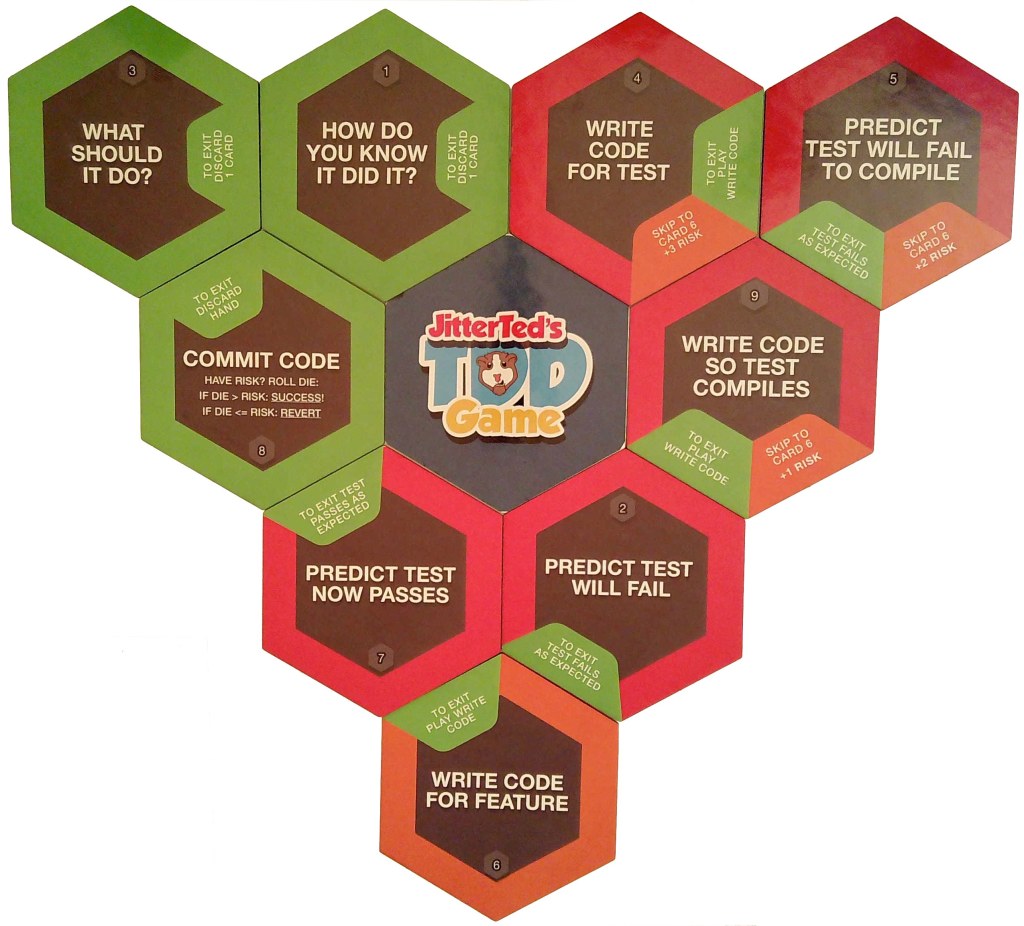
Starting at the top left of the image, and moving clockwise:
- Decide what to do next (this is probably the hardest part of TDD, needing the most skill). Difficultly to decide on the next step is interesting feedback: the design of the code might not be appropriate. Perhaps you need to refactor first?
- Decide how you can know when it’s done (essentially, the acceptance criteria for this loop of the TDD cycle). Difficultly in working out to test the acceptance criteria is also a good feedback step. Is the current design of the code too brittle? Perhaps you need to refactor first?
- Write the code for the test. This is the step that trips up most naive TDD’ers. How can you write tests against code that doesn’t exist yet? Nevertheless, this exactly what you do.
- Predict that the test will fail to compile. This is a very interesting step. If you can’t make a prediction, it’s means you don’t understand the code. That’s very useful feedback! When you test the prediction, was your prediction correct? If not, that also very interesting feedback.
- Write code so the test compiles. Note that you don’t actually implement the feature yet. You’re doing the minimum possible to make the code compile, and nothing else.
- Predict the test will fail. When you test this prediction, was it what you expected? If not, you’ve just learned something very valuable about your understanding of the code.
- Write code for the feature.
- Predict the test now passes. When you test this prediction, was it as you expected? Feedback!
- Commit code.
This entire loop can very very tight, often in the measure of minutes, and definitely not more than half an hour. Taking longer shows a lack of understanding about the work to be done, and how to do it. Often, it means that the code base is note well designed.
GeePaw Hill has a similar concept: Many More Much Smaller Steps (MMMSS).
Acceptance Testing Loop
It’s worth calling out Acceptance Test Driven Development (ATDD) as it’s own feedback loop. The GOOS book represents the ATDD loop like this:

ATDD forms a larger feedback loop around a series of smaller TDD loops. The key part of ATDD involves deciding ahead of time what the acceptance criteria should be. A high performing team can automate these acceptance criteria in as the first thing. The TDD loop continues until the acceptance test passes.
Pair Programming Loop
By far the tightest feedback loop comes from pair programming. A pair programming sessions provides almost continuous feedback about the code and design is happening in real time. This tight feedback allows the pairing team to use the total of all their skills to get the best possible outcomes. If the pair is doing predictive TDD, the shared understanding and learning is happening about as fast as possible.
Reviewing code after it has already been written provides some useful feedback, but it is actually very hard work to do it well. And, when push comes to shove, the code has already been written. Loss aversion kicks in, and people can be much difficult to throw bad code away. Code that would not have been written in the first place during a pairing session.
Small Batch
The key to fast feedback is small batch. This was one of the major themes in the book The Goal, and expanded upon in The Phoenix Project as it relates to software. I go into more detail above in the user feedback loop. Alistair Cockburn called this “Elephant Capaccio“, and gives training on how to do this. I’ll expand upon this theme in a different post.
Building within Constraints
The final leg of the engineering approach is to solve problems within constraints. The contraints can be things like:
- Budget. Businesses need to worry about balancing revenue and costs, and making a profit. Failure to solve problems within a timely manner can kill a company. A perfectly engineered solution with beautifully crafted code can still be a failure if it doesn’t work within the budget constraints.
- Competition. Most companies work within a competitive market. The features and capabilities of other companies can drive what you yourself need to do
- Organisational. Large companies need to coordinate people and resources to achieve goals. The common tactic is to divide large groups into smaller groups, and coordinate between them. How this is done within a company can have impacts on the solution. This is the basis of Conways Law.
- Social. The solutions that people find valuable will depend upon many social factors. Some solutions can be valuable, but still socially unacceptable, and hence not viable.
- Technical. Existing tools, libraries, frameworks, infrastructure, and algorithms limit what is possible. New tools and frameworks can create new opportunities for new solutions.
- Quality. A buggy or shoddy solution can make a good idea unviable.
All these constraints need to be balanced. All poeple involved in the process need to be evaluating the evolution of the solution in the context of these (and other) constraints.
Feedback
Continuing with the theme of this post, feedback loops are critical. So, what feedback can you give to me? In the above, what do you agree with? What do you think is wrong, or would do differently?
 Renaissance Developer